Interactive Brokers Trading Journal: Track Your IBKR Performance the Easy Way
Import supported Interactive Brokers stock trades, calculate net P&L after commissions and fees, and review the patterns that are hard to see in broker reports or spreadsheets.
14-day free trial. Then $89 per year or $9 per month. Imported trades and cashflows stay local.
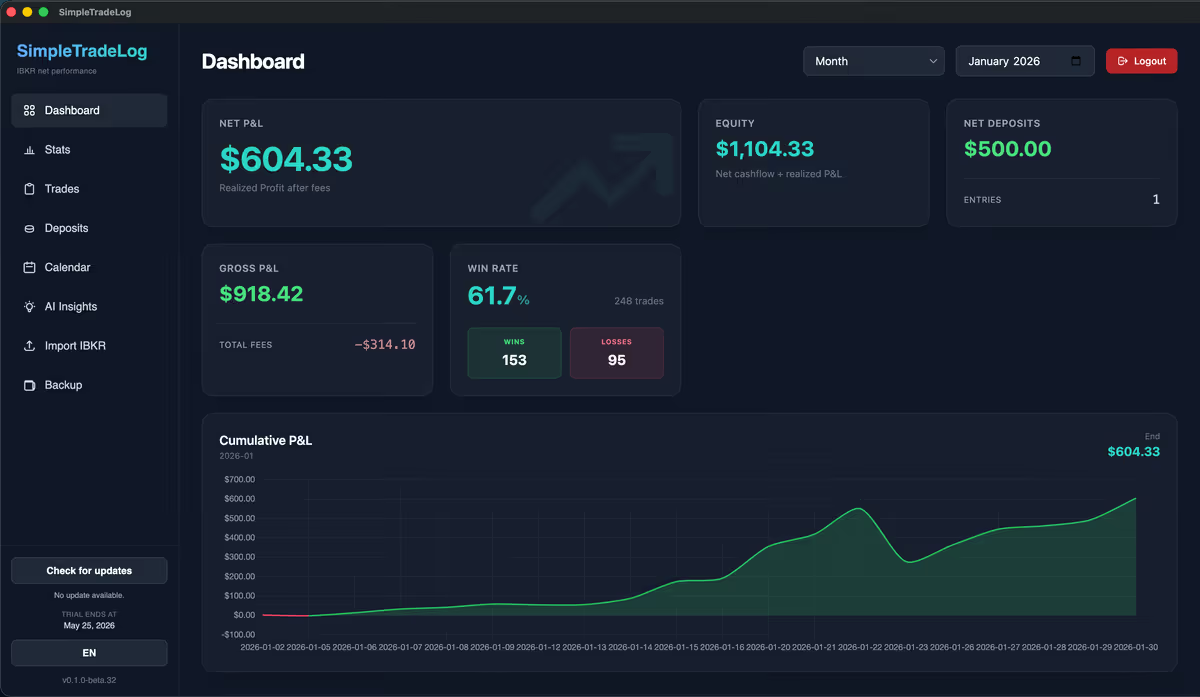
If you trade with Interactive Brokers, keeping an accurate trading journal is one of the fastest ways to make your review process more objective.
IBKR provides excellent reporting, but broker statements are not designed to answer every performance question over time. Finding your biggest winners, recurring mistakes, net profit after commissions, or performance by ticker often turns into exporting reports and maintaining spreadsheets.
A dedicated trading journal removes much of that manual work so you can spend more time reviewing decisions and less time cleaning up data.
Why every Interactive Brokers trader needs a journal
Most traders focus heavily on finding better entries. Fewer spend enough time reviewing completed trades.
Which stocks make money?
Review symbol-level results instead of relying on recent memory.
Which setup performs best?
Compare outcomes across the trade ideas you actually execute.
Am I profitable after costs?
Measure net P&L after commissions and fees, not only gross results.
Which days are strongest?
Look for time-based patterns in daily and weekly performance.
Am I cutting winners early?
Compare average winner, average loser, win rate, and outlier trades together.
Which mistakes repeat?
Spot patterns that keep showing up across different symbols or sessions.
Why Excel spreadsheets become a problem
Many IBKR traders start with Excel or Google Sheets. That can work for a while, especially with low trade volume and a simple review process.
- Manual data entry and copy-paste cleanup
- Formula mistakes that are difficult to detect
- Missing commissions or regulatory fees
- Incorrect net profit calculations
- Slow filtering as trade history grows
Import an IBKR statement file
Interactive Brokers already contains the trade data you need. A good journal should let you choose and import a supported Activity Statement instead of asking you to enter every trade by hand.

Why net P&L matters
One mistake many traders make is only looking at gross profit. Your actual profitability depends on commissions and fees.
For active traders making dozens or hundreds of trades each month, those costs add up quickly. A proper journal calculates gross P&L, total commissions, net P&L, win rate, average winner, and average loser together.
What makes a good IBKR trading journal?
The best trading journals focus on the review workflow you will actually repeat.
| Capability | Why it matters | What to avoid |
|---|---|---|
| IBKR statement import | Reduces manual data entry and cleanup | Typing trades into forms after every session |
| Commission calculations | Shows the real cost of frequent trading | Ignoring fees or treating gross P&L as final |
| Trade history | Lets you inspect individual entries, exits, and symbols | Only reviewing account totals |
| Performance dashboard | Makes period review fast enough to maintain | Dashboards with dozens of unused widgets |
| Local storage | Keeps imported trade history on your computer | Uploading sensitive trade history when you prefer local review |
A focused desktop journal for IBKR traders
SimpleTradeLog was built for Interactive Brokers stock traders who want a straightforward trading journal without unnecessary complexity. It imports Interactive Brokers .tlg trade logs and activity statement .csv files, calculates net results after costs, and provides trade history, dashboards, statistics, and local backups.
Imported trades and cashflows stay on your computer. Account, license, and billing checks are online.
Simple pricing after the 14-day free trial: $89 per year or $9 per month.

SimpleTradeLog is a good fit if you
- Trade through Interactive Brokers
- Want to stop maintaining spreadsheets
- Care about accurate net P&L
- Need commission and fee tracking
- Prefer focused desktop software
You may prefer another workflow if you
- Need broker coverage beyond Interactive Brokers today
- Want a cloud platform with sharing, mentoring, or coaching workflows
- Prefer building a fully custom spreadsheet despite the maintenance
Continue researching IBKR journals
Learn how to analyze Interactive Brokers trading performance, follow the Interactive Brokers statement import guide, compare the best trading journal for Interactive Brokers, read the focused IBKR trade journal guide, learn when to replace a trading journal spreadsheet, or compare TraderVue, TradeZella, and TraderSync alternatives.
Frequently asked questions
Practical answers for Interactive Brokers traders evaluating a journal.
Can I import Interactive Brokers statements?
Yes. Export an Interactive Brokers activity statement and import the file into SimpleTradeLog.
Does it calculate commissions?
Yes. Commissions and applicable fees are included when calculating net profit and loss.
Is my trading data stored in the cloud?
No. Imported trades and cashflows stay local on your computer. Account, license, billing, and anonymous product analytics use online services; analytics can be disabled in the app.
Does it support Interactive Brokers only?
SimpleTradeLog currently focuses on Interactive Brokers .tlg trade logs and activity statement .csv files.
Final thoughts
Keeping a trading journal is one of the highest-impact review habits you can build as a trader. The goal is not to collect more numbers for their own sake; it is to understand what happened clearly enough to improve the next decision.
Rather than maintaining spreadsheets, you can import Interactive Brokers statements, review your trades, and focus on the patterns that matter: net performance, symbols, costs, and repeatable mistakes.
Start reviewing IBKR trades without spreadsheet cleanup
Import Interactive Brokers statements, track commissions and net P&L, and review performance in a focused desktop journal.