Best Trading Journal for Interactive Brokers Traders
A trading journal can turn supported Interactive Brokers export data into a repeatable review process.
14-day free trial. No credit card required. Then $89 per year or $9 per month.
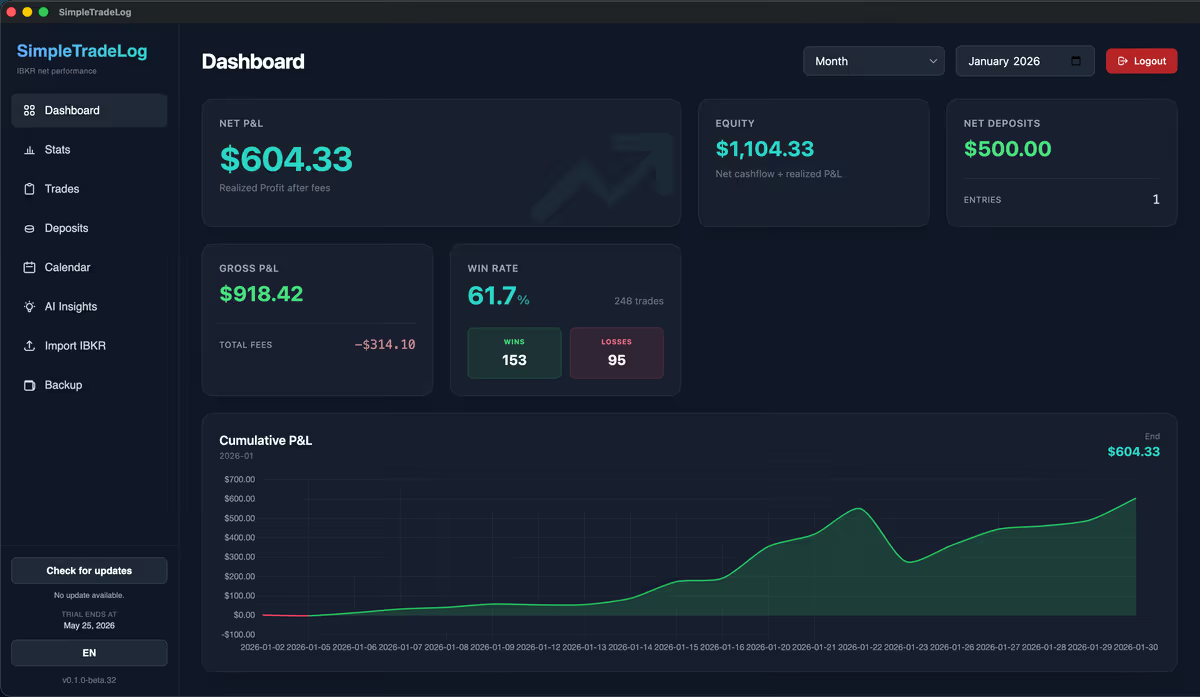
Interactive Brokers provides detailed account records, but those reports are not the same as a focused review workflow.
Many IBKR traders eventually face the same question: how should completed trades be reviewed consistently?
This guide explains what to look for in a trading journal for Interactive Brokers and how to choose a solution that fits your workflow.
Why Interactive Brokers traders need a journal
Most traders spend countless hours searching for better entries, better indicators, and better setups. Far fewer spend time analyzing their actual results.
Which setups make money?
Separate working trade ideas from patterns that only feel familiar.
Which tickers perform best?
Find the symbols where your process has the clearest edge.
What mistakes repeat?
Spot habits that keep showing up in losing trades.
Are results improving?
Compare performance over time instead of relying on memory.
How much do costs matter?
Understand how commissions and fees affect profitability.
Easy statement imports
Not all trading journals are designed with Interactive Brokers in mind. A good IBKR trading journal should make importing broker data straightforward.
The less time spent preparing data, the more time you have for reviewing trades.
- Activity statements
- Trade imports
- Commission tracking
- Fee tracking


Net P&L tracking
Gross profits tell only part of the story. Interactive Brokers reports include commissions, regulatory fees, and other trading costs.
A good journal should calculate gross P&L, fees, and net P&L automatically because net performance is what actually matters.
Performance analytics
The best trading journals help traders identify patterns that are hard to see from individual trades.
Win rate
The percentage of profitable trades.
Average winner
Average profit per winning trade.
Average loser
Average loss per losing trade.
Profit factor
Gross profits divided by gross losses.
Net P&L
Performance after fees and commissions.
Performance by symbol
Identify where your edge exists.

Common ways traders track performance
Most IBKR traders fall into one of three categories: spreadsheets, cloud-based journals, or desktop trading journals.
Spreadsheets
Excel and Google Sheets are flexible, low cost, and fully customizable.
- Manual imports
- Formula maintenance
- Time consuming as trade volume grows
Cloud-based journals
Browser journals can offer advanced analytics and large feature sets.
- Monthly subscriptions
- Complex workflows
- More features than some traders need
Desktop journals
Desktop journals focus on a dedicated local experience.
- Fast performance
- Focused workflow
- Dedicated application
- Device-specific access
Popular cloud-based examples include TraderVue, TradeZella, and TraderSync. For many active traders, desktop software feels closer to a professional trading environment.
Built for the IBKR review workflow
I trade using Interactive Brokers. Like many traders, I found myself stuck between two extremes: spreadsheets on one side, and large journaling platforms with extensive feature sets on the other.
SimpleTradeLog was built for a narrower workflow: manually import supported IBKR stock trades from .tlg or activity statement .csv files, calculate net P&L, and review trades without maintaining spreadsheet formulas.
Features that matter most for IBKR traders
When evaluating any trading journal, focus on features that directly improve your review process.
Import IBKR statements
Reduce manual data entry.
Track net performance
Understand what actually reaches your account.
Review trade history
Identify recurring strengths and weaknesses.
Analyze symbols
Discover which stocks fit your strategy best.
Measure progress
Evaluate improvement objectively.
Continue researching IBKR journals
Read the Interactive Brokers trading journal guide, learn how to analyze Interactive Brokers trading performance, follow the focused IBKR trade journal guide, learn how to export an Interactive Brokers activity statement or use the Interactive Brokers statement import guide, open an IBKR .tlg file, compare an offline trading journal, learn when to replace a trading spreadsheet, or review pricing.
Frequently asked questions
A few practical considerations when choosing the best IBKR trading journal software for your workflow.
What is the best trading journal for Interactive Brokers?
The best journal depends on your workflow. Many traders use spreadsheets, cloud-based journals, or dedicated desktop applications. The most important factor is consistency: choose a journal you will actually use after every trading session.
Does Interactive Brokers include journaling tools?
Interactive Brokers provides extensive reporting but is not designed as a dedicated trade journaling platform. Many traders use separate software to review performance.
Do I need a trading journal to become profitable?
Not necessarily. However, most consistently improving traders maintain some form of structured review process.
What should I track in a trading journal?
At minimum: entry, exit, position size, net P&L, and trade notes. Many traders also track setups, emotions, and recurring mistakes.
Final thoughts
Interactive Brokers provides detailed reporting. A trading journal can organize supported export data for a more focused review.
The best trading journal for Interactive Brokers is not necessarily the one with the most features. It is the one that helps you consistently review trades, identify mistakes, and improve your decision-making over time.
Review Interactive Brokers trades with less friction
Import IBKR data, track net P&L, analyze your trading history, and build a review habit you can maintain.