An offline trading journal for private trade review
If you prefer a desktop-first workflow, SimpleTradeLog keeps imported trade and cashflow data local while using online services for account, licensing, billing, downloads, and anonymous product analytics.
Trades and cashflows stay local on your computer. Account and license checks are online.
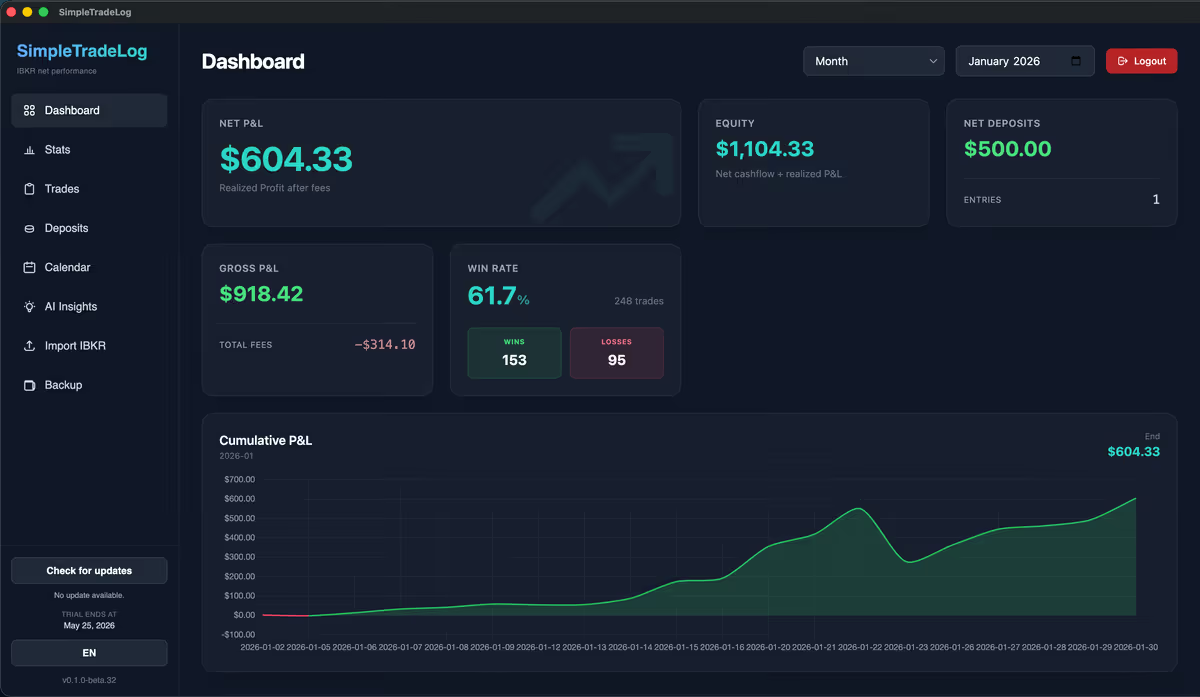
Why traders look for an offline journal
Trade history is personal. It can reveal account size, strategy, symbols, frequency, losses, and behavior under pressure. Some traders are comfortable using a cloud journal; others prefer to keep raw trade data on their own machine.
A local-first desktop journal is a good fit when control over imported trade data matters more than web sharing, coaching portals, or social features.
What "private" should mean in a journal
Privacy claims are only useful when they are specific.
Local trade data
Imported executions and cashflows are stored on your computer.
No browser dependency
Review trades in a desktop app instead of another cloud dashboard.
Exportable backups
Keep a portable JSON backup of your app data when needed.
Clear online boundary
Know what still uses the internet: account, license, billing, and downloads.
Offline journal vs cloud journal
Neither model is best for every trader. Choose based on your workflow.
| Need | Cloud journal | Offline desktop journal |
|---|---|---|
| Access anywhere | Usually stronger | Tied to installed machine |
| Sharing and coaching | Often built in | Usually limited |
| Local data control | Depends on provider | Core advantage |
| Focused review | Can include many features | Can stay lean and fast |
| Broker imports | Varies by product | Best when built for your broker export |
SimpleTradeLog's local-first workflow
SimpleTradeLog is a desktop app for Interactive Brokers stock traders. It manually imports supported IBKR files, calculates net results after costs, and lets you review performance while storing imported trades locally.
IBKR imports
.tlg trade logs and activity statement CSV files.
Net performance
P&L after commissions and applicable fees.
Desktop review
Dashboard, calendar, trades table, statistics, and notes.
Local backup
Export and import a single JSON backup from inside the app.

A cloud journal may fit if you...
- Need browser access from many devices
- Share trades with coaches or communities
- Want screenshot hosting or public reports
- Prefer managed cloud storage over local files
An offline journal may fit if you...
- Want imported trade data stored locally
- Use Interactive Brokers and care about net results
- Prefer a focused desktop workflow
- Do not need social, coaching, or sharing features
Continue researching private trade review
Open an IBKR .tlg file, import Interactive Brokers statements, compare the best trading journal for Interactive Brokers, or see when to replace a trading spreadsheet.
Frequently asked questions
Common questions about offline and private trading journals.
Is SimpleTradeLog fully offline?
No. Imported trades and cashflows stay local, while account, license, billing, downloads, and anonymous product analytics use online services. Analytics can be disabled in the app.
Does SimpleTradeLog upload my trades?
No. SimpleTradeLog does not upload imported trades and cashflows to its servers for journaling.
Can I back up my local journal?
Yes. The app supports export and import of a JSON backup.
Which broker is supported?
SimpleTradeLog focuses on Interactive Brokers .tlg trade logs and activity statement CSV files.
Keep your trade review on your desktop
Import Interactive Brokers exports, review net performance, and keep your journal data local on your computer.